|
By Jeff Belmont
Many users are taken aback at the sight of the backlight overlapping part of the picture in their new notebook monitor, desktop display, or LCD TV. It’s often assumed that this is an egregious problem that needs correcting. This article will outline that the sight of the backlight seeping part of the way into the picture – known as “backlight bleeding” – is actually a common occurrence, and should (in most cases) be permissible.
The term “backlight bleed” is synonymous with LCD screens, be they CCFL or LED backlit, but is most commonly associated with LED backlighting due to modern implementation (see below). The most prevalent occurrence with backlight bleed comes from “edge-lit” displays, where LEDs are arranged along the edge of the display and illuminate the screen via “light guides”. Since the source of illumination comes from the edges of the screen, we see backlight bleed from this array more than any other. The advantage to this design is a thinner and lighter profile, since the LEDs are not taking up real estate behind the screen (which would thus result in a thicker panel to accommodate the design).
Another backlighting concept is what is known as “full-array”. In this design, the CCFLs or LEDs are placed directly behind the LCD. This was the original design concept for flat panel displays and is still considered the best as far as picture quality is concerned, as it yields the best possible uniformity (meaning the screen is lit evenly throughout). Modern “local dimming” technology has also allowed both edge lit and full array designs to selectively dim the LEDs, allowing for superior contrast to their non-dimming counterparts.
With that out of the way, let’s take a look at some examples of backlight bleeding in LED displays.
|
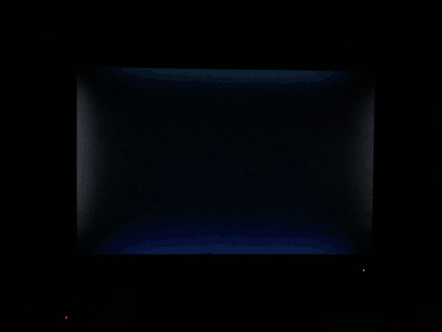
Figure 1 - Normal Backlight Bleed |
The above picture shows mild bleeding in the top, bottom, left and right quadrants of the display against a black picture. This amount of backlight bleed is perfectly normal and shouldn’t severely affect picture quality (in many cases, it won’t be noticeable unless against a dark background).
|
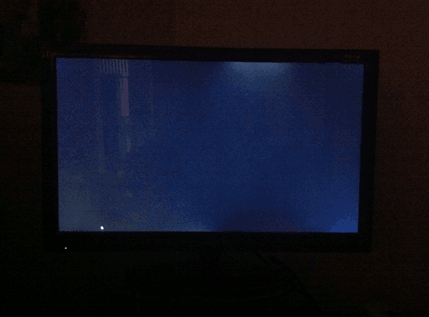
Figure 2 - - Egregious Backlight Bleed |
If a screen looks more like the one seen above in figure two, that’s considered excessive and should be serviced if under warranty.
Share on Facebook
|
|